When you open an active job in Recruit's Sourcing Hub, you see a list of matched candidates, each with a score. That score is designed to be explainable: you can see where the points came from and decide for yourself how much weight to give it.
The 100-point breakdown
- Skills: up to 60 points, for how many of the job's skills the candidate has.
- Experience: up to 25 points, for how the candidate's years of experience compare with the job's range.
- Location: up to 15 points, for whether the candidate is in or near the job's location.
A score of 60 or more counts as a match. The weighting is deliberate: skills are the strongest signal of whether someone can do the job, experience is a useful check on level, and location matters but should rarely decide on its own.
Smarter than exact keywords
Pure keyword matching misses good candidates who describe the same skill differently. Recruit's scoring understands skill synonyms, grouped skills and city aliases. A candidate who lists "JS" is credited for JavaScript; someone in "Bengaluru" matches a job in "Bangalore".
Where matched candidates come from
The Sourcing Hub shows matches in two tabs. Your candidates shows people from your own database — everyone you have imported, uploaded or added. Suggested shows people from the CareerCtrl Talent Network and job seekers on CareerCtrl who are open to work.
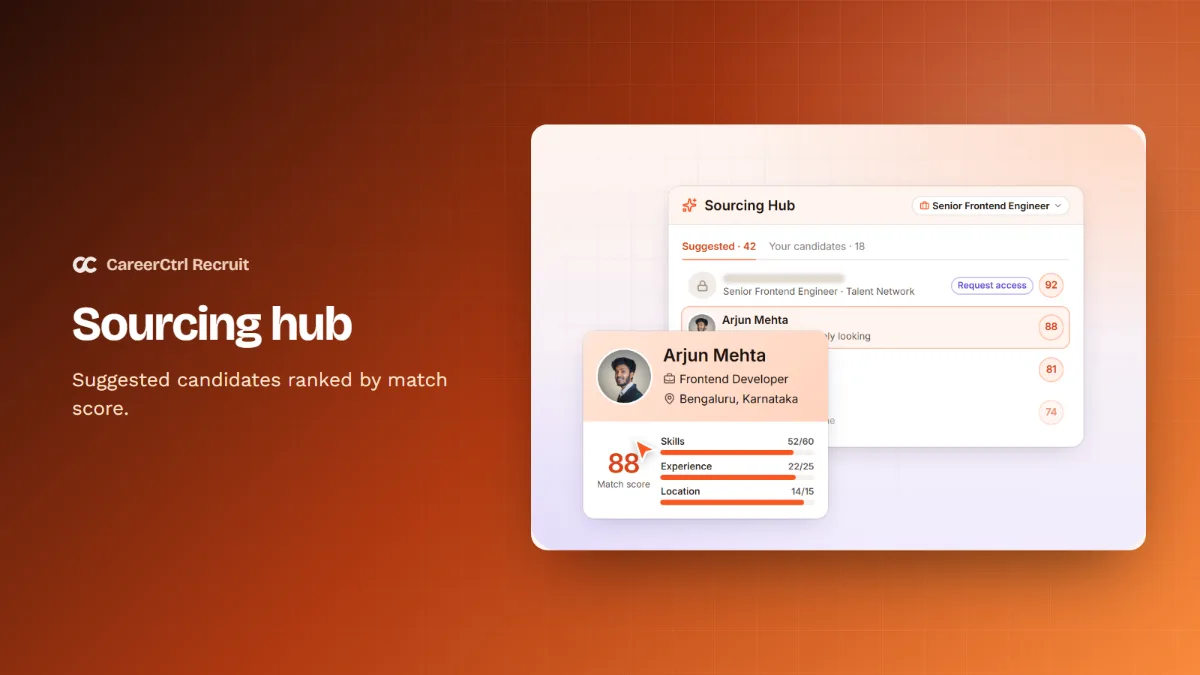
Talent Network profiles appear anonymised. To see a full profile, you send an access request; the organisation that owns the candidate approves or declines it. For CareerCtrl job seekers, you can send an invitation to apply to your job, and you will see whether they accept or decline.
Using scores well
- Fix the job's skills list first. Scores are only as good as the skills on the job, so make sure they reflect what you will actually assess.
- Sort by score, then read. Use the score to decide reading order, not to make the decision.
- Look at the breakdown, not just the total. A candidate at 58 with full skills points and no location points may be a great remote hire.
- Check below the threshold for scarce skills. For hard-to-fill roles, the right person may be just under 60.
Save the search as a talent pool
If you hire for similar roles repeatedly, save the search as a talent pool. A pool can filter on keywords, skills (any or all of them), locations, experience, notice period and source. Preview who is in it, see new matches as they arrive, and schedule alerts so new candidates come to you. When a matching job opens, you can invite pool members to apply.
Pools also work well for roles you hire for every few months. Rather than starting each search from scratch, open the pool, check who has joined since last time, and contact them before the job is even posted.
What scores do not measure
A score cannot tell you about motivation, communication or how someone approaches problems. It also only knows what is written in a profile, so a thin resume can understate a strong candidate. Treat the score as a way to spend your reading time well, and keep the judgement for the interview.
A good score tells you who to read first. It should never be the reason you stopped reading.
Book a demo: We'll open the Sourcing Hub on a real role and walk through scores, talent pools and the Talent Network in 30 minutes.