Onyx resume template
Onyx is a free ATS-friendly, two-column, one-page resume template. Fill it with AI in CareerCtrl, check your ATS score and download a PDF. A minimalist black-and-white two-column resume with an optional photo. Your name sits in tracked capitals beside a square, frame-offset portrait, contact details are laid out as a labelled grid, and a fine vertical rule divides experience and projects from skills and education. The text is selectable and reads in a natural, ATS-friendly order. Made for web developers, software engineers and other tech professionals.
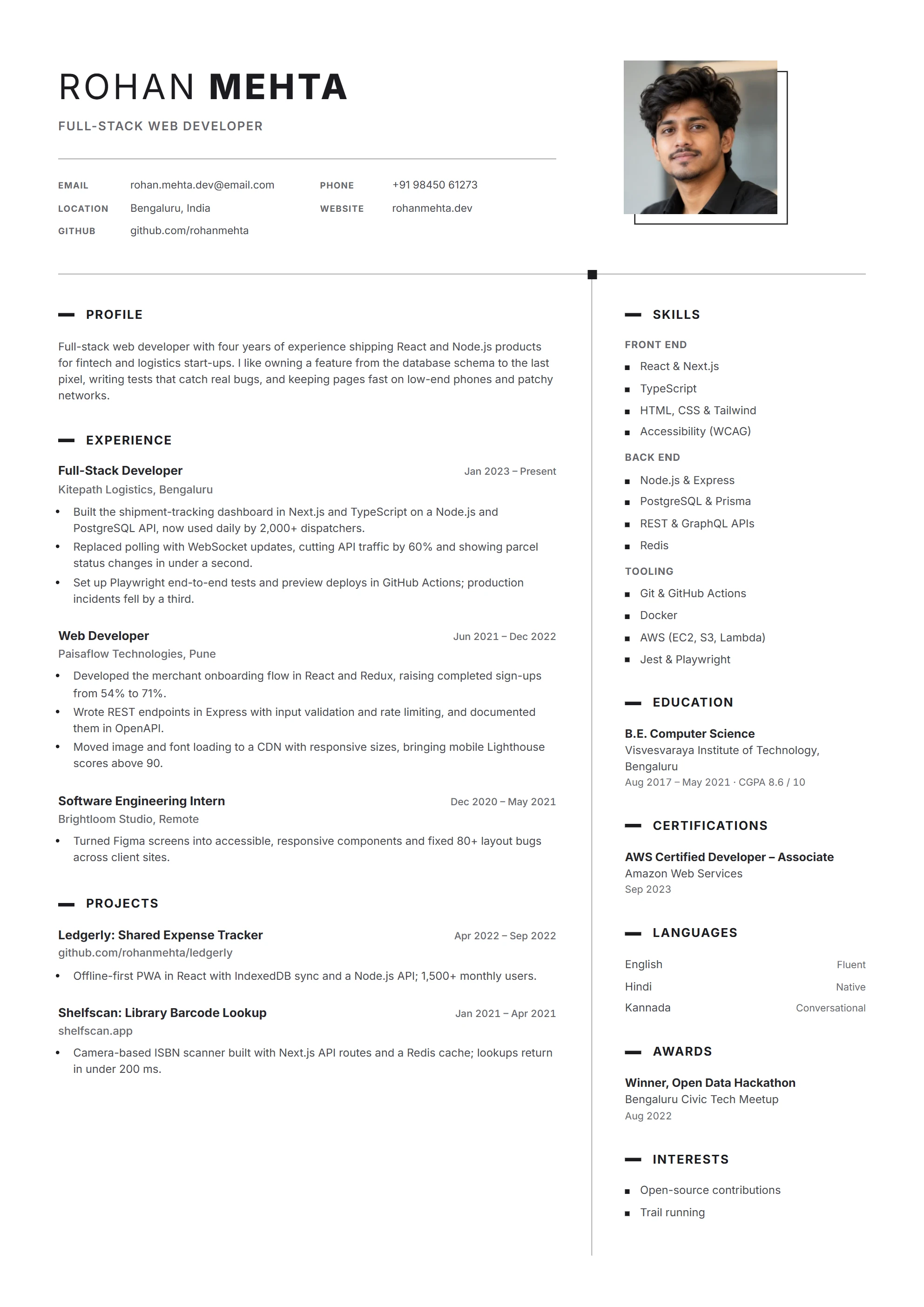
About the Onyx resume template
Onyx suits college students and entry-level to senior candidates in web development, software engineering and tech.
- Price: Free
- ATS: ATS-friendly
- Layout: Two columns
- Length: One page
- Photo: Has a photo space
- Style: Modern, simple, minimalist and clean
- Colours: Black and white and monochrome
- Experience: College students and entry-level to senior candidates
- Best for: Web development, software engineering and tech
Questions about Onyx
Is the Onyx resume template free?
Yes. Onyx is free to use. Fill it in with the CareerCtrl AI resume builder and download it as a PDF with no watermark.
Is the Onyx resume template ATS-friendly?
Yes. Its two columns hold real text, not images, so an applicant tracking system can read every section. Fill it in, then run it through the free ATS resume checker to see your score before you apply.
Does Onyx fit on one page?
Yes, Onyx is laid out as a one-page resume. If your content runs over, cut older roles to one or two lines and keep the bullets that show results with numbers.
When should I use Onyx, a template with a photo?
Use Onyx where a photo on a CV is common, as in the Middle East and parts of Europe and Asia, or when you send your resume straight to a person. Most employers in the US and UK don't expect a photo, so for those applications an ATS-friendly template without one is the safer choice.
Collections with Onyx
- Modern resume templates: Most corporate and startup roles where you want a fresh, clean look.
- Executive resume templates: Senior managers, directors and leaders with a long track record.
- Free ATS-friendly resume and CV templates: Online applications through job portals and company career sites.
- Simple resume templates: Freshers and anyone who wants a quick, no-fuss resume.
- Two-column resume templates: Experienced candidates with lots of skills and certifications to fit.
- One-page resume templates: Freshers and early-career roles where recruiters expect one page.
- Resume templates with photo: Countries and companies where a photo on the CV is expected.
- Software engineer resume templates: Developers and IT roles that need room for a tech stack and projects.
- Fresher resume and CV templates: Students and recent graduates with little work experience.
Templates like Onyx
- Peony resume template: Also two columns and one page, for web development and tech
- Admiral resume template: Also ATS-friendly and one page
- Vertex resume template: Also ATS-friendly and one page, for tech
- Basalt resume template: Also two columns, one page and a photo
Check your resume with the free ATS resume checker
How to use the Onyx resume template
- Open the Onyx resume template in the CareerCtrl AI resume builder. It's free to start, with no card needed.
- Add your details, or import an existing resume and let CareerCtrl fill in the sections for you.
- Use the AI suggestions to tailor each section to the job you want, then check the result against the job description.
- Download your resume as a PDF. You can switch to another template at any time without typing anything again.