Marigold resume template
Marigold is a premium two-column, photo resume template. Fill it with AI in CareerCtrl, check your ATS score and download a PDF. A bold, friendly two-column resume with a portrait on a marigold arch, navy and yellow corner accents and a soft grey sidebar for contact details, profile, skills and languages. A large two-line name and a clean vertical timeline make experience and education easy to scan. Built for graphic designers, brand designers and other creative professionals.
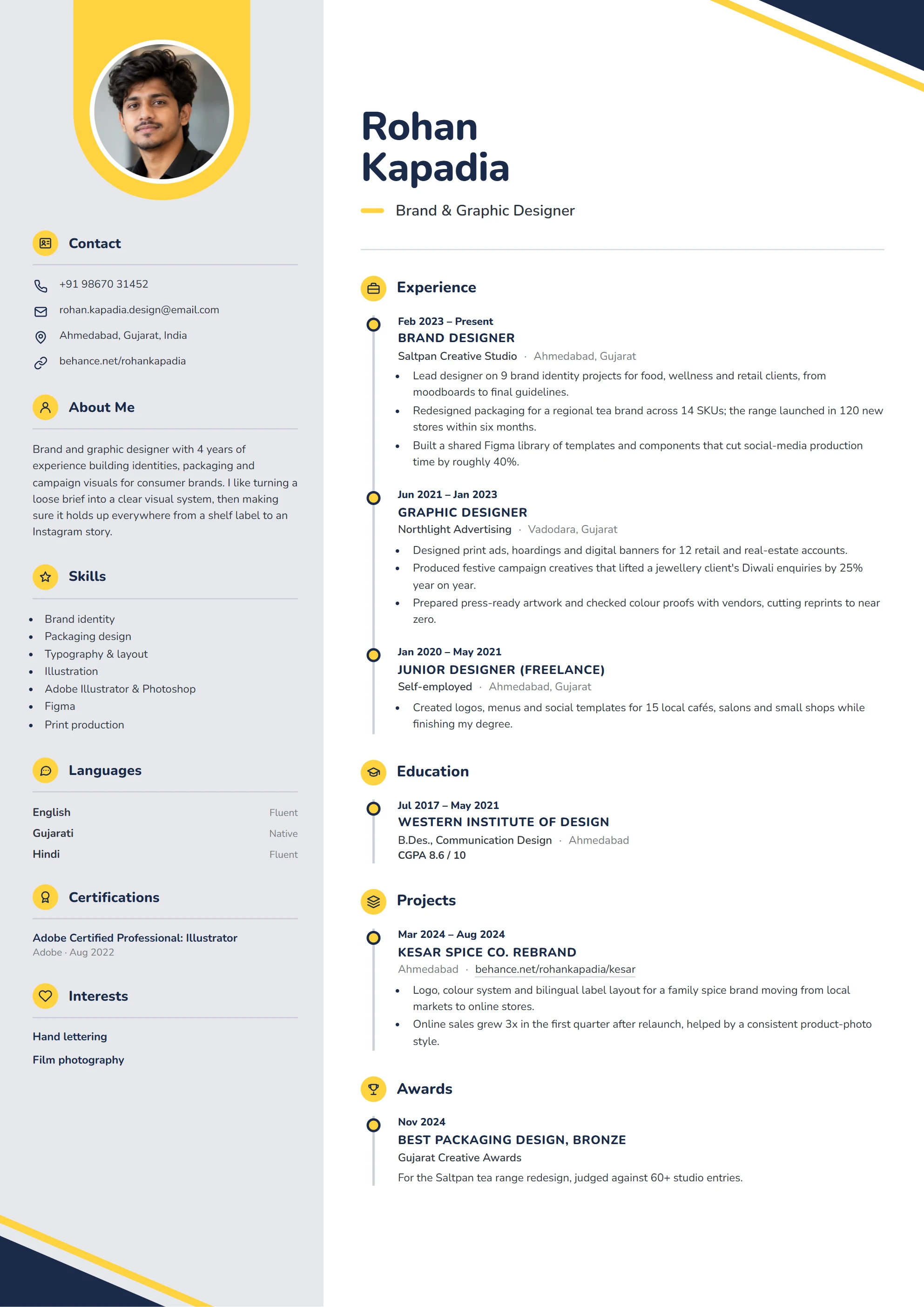
About the Marigold resume template
Marigold suits roles in graphic design and design.
- Price: Pro (included in Pro Lite and Pro)
- ATS: Design-first, not built for ATS
- Layout: Two columns with a sidebar
- Photo: Has a photo space
- Style: Modern, creative and bold
- Design details: A timeline for work history
- Colours: Navy and yellow
- Best for: Graphic design and design
Questions about Marigold
Is the Marigold resume template ATS-friendly?
Marigold is a design-first template with a photo, so it is not built for applicant tracking systems. It works best when a person reads it first: a referral, a direct email to a recruiter or a portfolio. For job portals and company career sites, pick one of the ATS-friendly resume templates.
When should I use Marigold, a template with a photo?
Use Marigold where a photo on a CV is common, as in the Middle East and parts of Europe and Asia, or when you send your resume straight to a person. Most employers in the US and UK don't expect a photo, so for those applications an ATS-friendly template without one is the safer choice.
Collections with Marigold
- Modern resume templates: Most corporate and startup roles where you want a fresh, clean look.
- Two-column resume templates: Experienced candidates with lots of skills and certifications to fit.
- Resume templates with photo: Countries and companies where a photo on the CV is expected.
- Creative resume templates: Design, marketing and media roles that reward a distinctive look.
Templates like Marigold
- Basalt resume template: Also two columns and a photo, for graphic design and design
- Sapphire resume template: Also two columns and a photo
- Cameo resume template: Also two columns and a photo
- Blush resume template: Also two columns and a photo, for design
Check your resume with the free ATS resume checker
How to use the Marigold resume template
- Open the Marigold resume template in the CareerCtrl AI resume builder. It's free to start, with no card needed.
- Add your details, or import an existing resume and let CareerCtrl fill in the sections for you.
- Use the AI suggestions to tailor each section to the job you want, then check the result against the job description.
- Download your resume as a PDF. You can switch to another template at any time without typing anything again.
More in Resume templates
- Celadon resume template
- Espresso resume template
- Graphite resume template
- Creative Violet resume template
- Sterling resume template
- Amber resume template
- Cardinal resume template
- Juniper resume template
- Executive Teal resume template
- Balanced resume template
- Corporate Mono resume template
- Essential ATS resume template